
Review partner listing edits side by side before approving
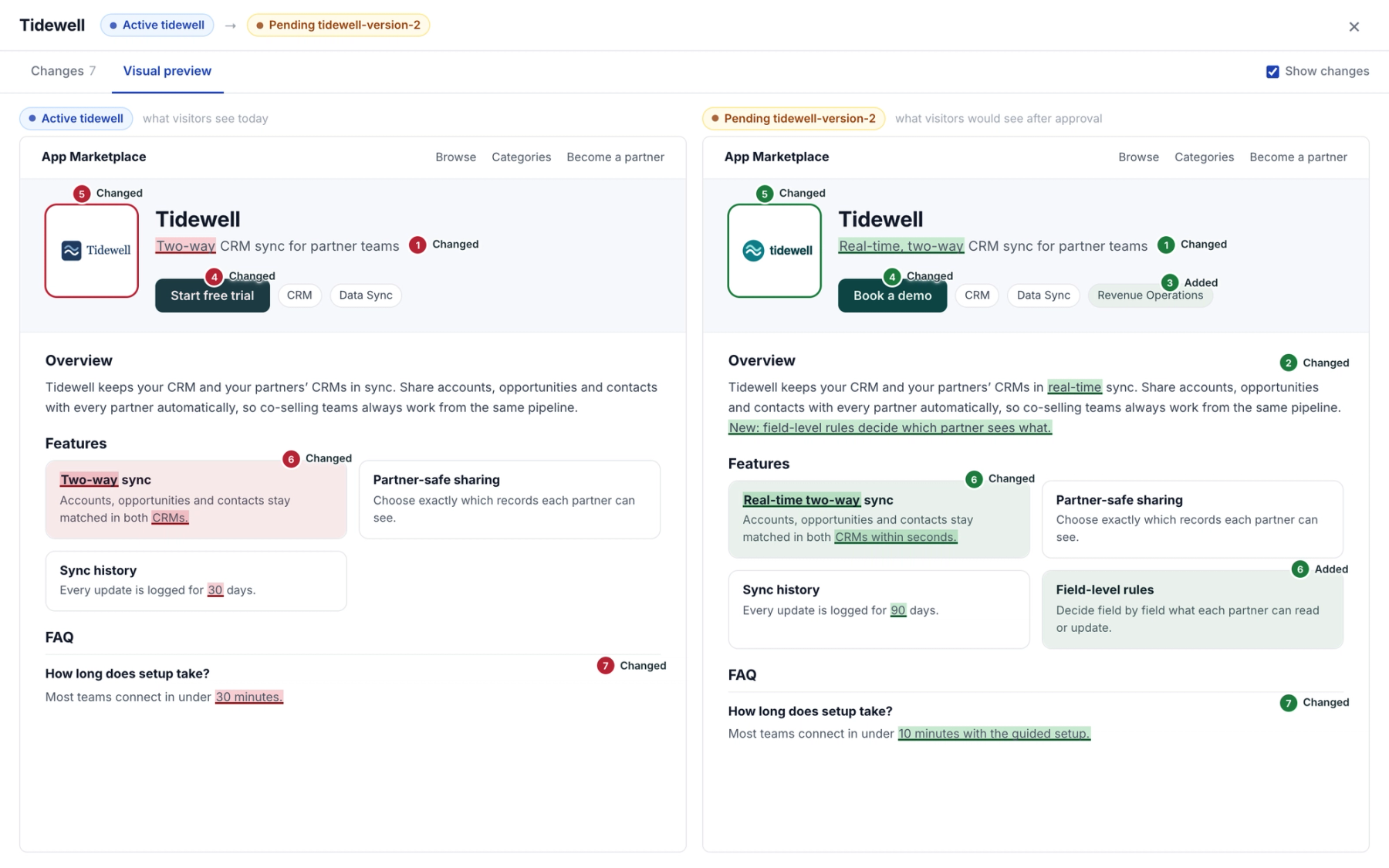
Partner Fleet's new listing review view shows every change a partner made to a listing, side by side with the live version, so you can approve or reject an edit from one screen.
Available to all Public Marketplace customers since September 23, 2026.
What changed
Listing review used to give you a more basic check of a partner's edit before you approved it, and as more partners keep their own listings current, we wanted that review to show you exactly what changed.
Now, clicking Review on a pending listing version opens a more detailed view that lists each edit the partner made, numbered and grouped by section, such as a new description, an added category, or a changed image. You can read the changes inline or side by side with the live listing, open a visual preview of both pages, and approve or reject from the same panel. Routine updates get approved faster, leaving more time for edits that need a closer look.
How to use it
- Go to Partner Listings, click Edit on the partner's row, and click Review on the version marked Pending.
- Scan the numbered changes inline or side by side, or open the Visual preview tab.
- Add a note for the partner if you need one, choose the marketplaces, then approve or reject.
For more detail, see Reviewing Partner Listing Updates in the Help Center.