
App marketplace software
Get more customers
to actually install the
integrations you offer
Partner Fleet’s App Marketplace helps SaaS product teams give signed-in customers one place to find and install every integration. Your team controls who can access each one.

Trusted by leading SaaS companies


Just because you have an integration
doesn’t mean it will get used
Teams spend a lot of time growing their integration ecosystem, from native and partner-built integrations to AI agents and more. Less time goes into helping customers find, understand, and install them.
- AvailableYou and your partners build and ship integrations, AI agents, and MCP servers.
- Most teams overlook this.FoundCustomers have one central place in the product to explore integrations.
- Most teams overlook this.UnderstoodCustomers see what each integration does, what data it uses, and how to set it up.
- InstalledCustomers connect the integration and use it in their day-to-day work.
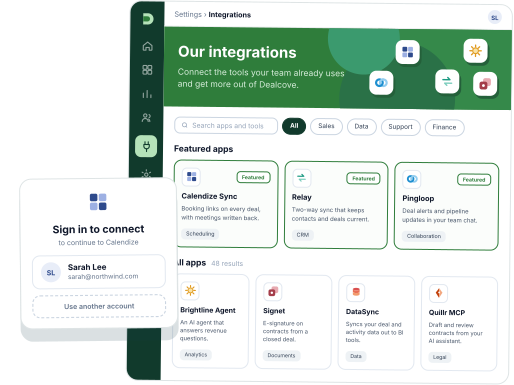
Help customers find, understand, and install every integration
Partner Fleet’s App Marketplace replaces the integrations page inside your product. Instead of engineers building and maintaining it, your team controls the listings, install buttons, and access rules.
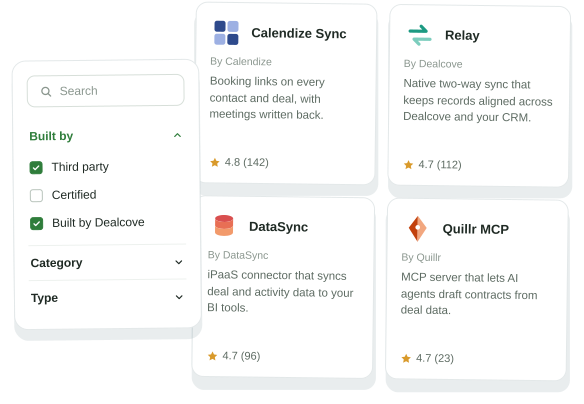
Every integration in one searchable catalog
Show customers every integration you offer, not just the ones your team built.
- Partner-built integrations
- Native integrations
- iPaaS connectors
- AI agents
- MCP servers
Customers search, filter, and install integrations inside your product or behind a gated login.
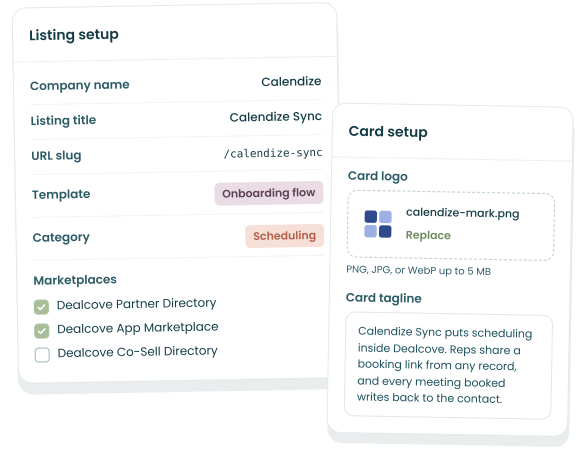
Keep listings updated without engineering
Your team updates descriptions, logos, and setup steps in Partner Fleet, instead of relying on engineering to hard-code them.
If you use Partner Fleet’s Partner Directory, prospects on your website will see the same content as customers inside your product.
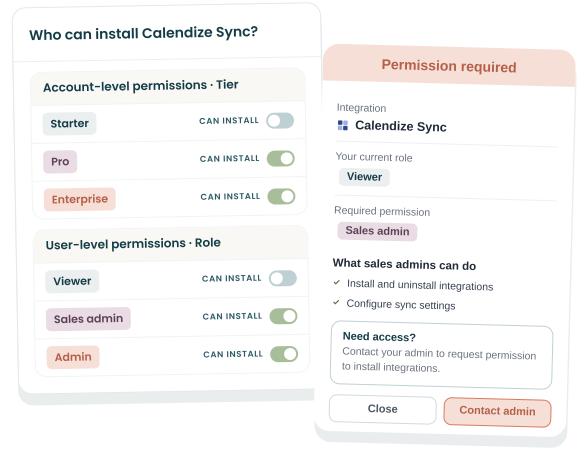
Control which integrations each customer can access
Decide who can see and install each integration, using the account and user details your product passes in at sign-in, through JWT or SAML SSO.
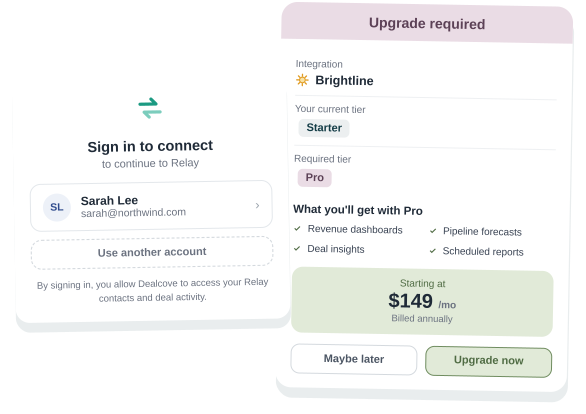
- Limit installs to the right plans and roles, and give each plan or role its own install path.
- Route customers who aren’t eligible to upgrade or to reach out to their admin.
The right install path for every integration
Each listing has an install button that sends customers down whatever setup path your product needs. Common ones include:
- OAuth
- Upgrade prompt
- Lead form
- Setup page in your product
- Deep link to partner
- API key
- Payment
- Admin request
Set each integration to install once per account or separately for each user.
See which integrations get installed, and by whom
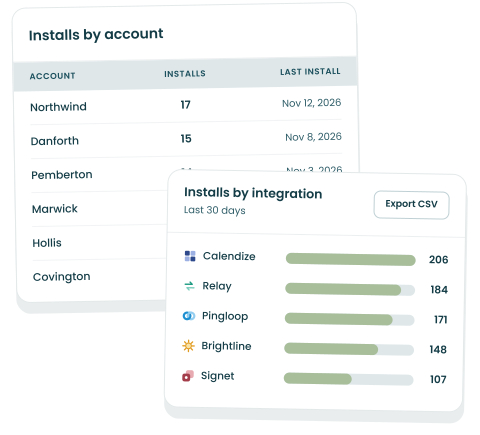
Partner Fleet tracks every install, using the integration status your product sends through the embed script or the Core API.
- See how many installs each integration gets.
- See how many integrations each customer account has installed.
- Filter activity by integration, partner, or account, and export it to CSV.
How does the App Marketplace tie integration adoption to revenue?
Every integration a customer installs ties your product deeper into their tech stack, which makes your product stickier.
- Reduce churn
Stickier products are harder to leave
Customers with more integrations installed use your product more and get more value from it, which makes it harder to switch to a competitor.
- Product-led growth
Upgrades and purchases at install
Show integrations that are only available on higher plans, then make the install path an upgrade or a payment.
- Ecosystem-led growth
Adoption earns partner investment
When partners see their integrations getting installed, they invest more in the relationship, which opens up co-marketing and co-selling.
- Prove value
Prove what adoption is worth
Pair install data with account and product data to show how adoption lines up with product usage, renewal rates, and revenue from upgrades.
How do you deploy the App Marketplace?
Partner Fleet’s App Marketplace runs embedded in your product or gated behind a login. Either way, you get the same listings, branding, permissions, and data.
Embedded inside your product
The marketplace renders inside a page of your product, so customers find and install integrations without leaving. Your product identifies each user with a signed token (JWT).
Gated behind a login, at its own domain
A standalone marketplace at its own web address, with your branding. Only signed-in customers can reach it, through your SAML single sign-on, with no embed script to install.
App marketplaces built to get integrations installed



How do you launch an App Marketplace with Partner Fleet?
Most teams go live in 4 to 8 weeks. Engineering typically spends 8 to 16 hours on setup, and your team configures the rest in Partner Fleet without code.
Plan the marketplace
- Decide whether to embed or gate your App Marketplace, and which integrations to launch first.
- Partner Fleet designs the marketplace to match your brand and shares it with your team for review.
Connect your product
- Link the App Marketplace to your product’s sign-in, through JWT or SAML single sign-on.
- Share each customer’s integration status from your product, so every install button shows the right next step.
Configure and test
- Set install paths and access rules, no code needed.
- Partner Fleet leads QA in staging, so everything works before your marketplace goes live.
Launch and measure
- Partner Fleet turns the marketplace on and monitors the launch, starting with a small group of customers if you like.
- Track installs by integration and by account from day one.
Questions buyers ask about app marketplace software
What is app marketplace software?
What is Partner Fleet’s App Marketplace?
Partner Fleet’s App Marketplace is an integration marketplace for your customers, run inside your product or behind a login. Customers browse, install, and manage integrations and AI agents in one place, and your team controls who can see and install each one. Until November 2026, it was called Partner Fleet’s In-App Marketplace. Partner Fleet’s public-facing directory of partners and integrations is a separate product, the Partner Directory.
How is Partner Fleet’s App Marketplace different from an integrations page we build ourselves?
Partner Fleet’s App Marketplace lets your team change listings, buttons, and access rules without an engineering ticket. An integrations page built in-house usually starts as a list. It then needs partner-managed content, status-based buttons, permissions, and adoption reporting, each built and maintained by your engineers. Partner Fleet provides those as settings, and partners keep their own listings current with your approval.
How long does it take to launch Partner Fleet’s App Marketplace, and how much engineering does it need?
Does Partner Fleet’s App Marketplace have to be embedded in our product?
Which systems does Partner Fleet’s App Marketplace connect to?
How is Partner Fleet’s App Marketplace priced?
Partner Fleet’s App Marketplace is sold as an annual subscription, in a Lite or an Enterprise version. It includes the marketplace, embedded or gated, with install buttons, access rules, and adoption data. You can buy the App Marketplace on its own or with other Partner Fleet products. It pairs well with the Partner Directory, since both publish from the same listings. Book a demo for a personalized quote.
Who is Partner Fleet’s App Marketplace not a fit for?
Partner Fleet’s App Marketplace is not a fit for teams whose integrations are installed for each customer by a sales or services team, with no self-serve step. It is also more than you need if your product has only a handful of integrations. The App Marketplace fits best when customers can install integrations on their own and your catalog is growing.
See the App Marketplace in action
Book a 30-minute demo to see how it works and what it takes to launch yours.
5.0 on G2